
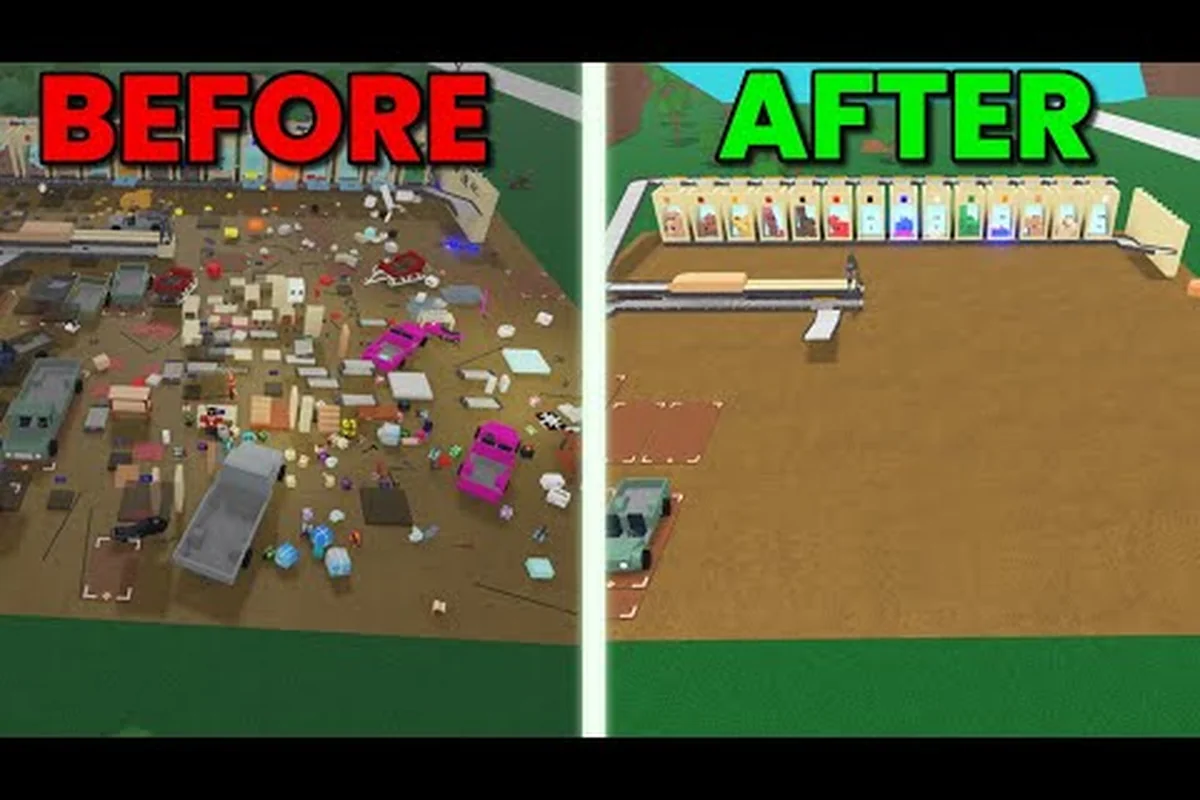
Building in Lumber Tycoon 2 is more than dropping planks on a plot. The game's physics, blueprint system, and hidden limits can turn a simple cabin into a frustrating mess of glitched Gray Wood and sideways vehicles. These lumber tycoon 2 building tips focus on the mechanics that actually matter: rotating blueprints to fix flipped items, respecting the blueprint limit, and choosing a base layout that survives server lag.
Understanding Blueprint Rotation Mechanics
Blueprint rotation is the most useful glitch in Lumber Tycoon 2 for builders who need to reposition loose items, vehicles, or even boulders. According to the community wiki's blueprint rotation tutorial, this technique is commonly used to bring vehicles back to an upright state or to remove boulders blocking the Taiga entrance without spending Dynamite. The core idea is that a blueprint's placement grid can force nearby loose objects to snap into a new orientation when the blueprint is placed or removed.
The rotation glitch works because blueprints have a defined collision box and placement logic. When you place a blueprint near a flipped vehicle, the game tries to resolve the overlapping geometry. In many cases, the vehicle gets pushed or reoriented as the blueprint settles into its slot. This is especially useful when retrieving rare wood types like Gold Wood or Frost Wood from difficult terrain, where a flipped truck can strand your entire haul.
How to Perform a Basic Rotation
To rotate a loose item with a blueprint, you need a cheap blueprint that you can afford to place and delete repeatedly. The Basic Blueprint from Wood R Us works well because it costs almost nothing and has a simple rectangular footprint. Place the blueprint so that one edge overlaps the flipped item, then immediately delete it. The deletion step often causes the item to snap back to a neutral orientation.
The timing matters more than the exact position. If you place the blueprint too far away, nothing happens. If you place it directly inside the item's collision box, the item may get launched or stuck in a wall. The sweet spot is usually a half-overlap, where the blueprint's edge intersects the item's center of mass. Practice on a flipped Wood R Us truck before trying it on a loaded trailer full of Frost Wood.
Common Rotation Failure Cases
Not every item responds to blueprint rotation the same way. Small loose items like Sawdust or individual planks may simply get pushed aside without reorienting. Large vehicles with multiple collision parts, such as the Val's All-Purpose Hauler, sometimes need multiple blueprint placements at different angles. If the item is stuck inside terrain, you may need to place a blueprint underneath it first to pop it out, then use a second blueprint to fix the orientation.
| Item Type | Rotation Difficulty | Recommended Blueprint | Notes |
|---|---|---|---|
| Small loose planks | Easy | Basic Blueprint | Single placement usually works |
| Flipped trucks | Medium | Basic Blueprint | Aim for half-overlap on the cab |
| Loaded trailers | Hard | Large Blueprint | Unload cargo first if possible |
| Boulders | Hard | Any blueprint | May require multiple attempts |
| Rare wood logs | Medium | Basic Blueprint | Rotate before loading onto trailer |
Working Within the Blueprint Limit
Every base in Lumber Tycoon 2 has a hard cap on how many blueprints you can place. The exact number depends on your plot size and server settings, but community testing consistently reports that exceeding the limit causes older blueprints to disappear or new ones to fail silently. Understanding the lumber tycoon 2 blueprint limit is essential before you start a large house project, because hitting the cap mid-build can force you to demolish finished sections.
The limit applies to placed blueprints, not to loose items or saved structures. A Sawmax 01 sitting on your plot does not count against the cap, but the blueprint you used to build it does. This distinction matters when you are planning a base with multiple buildings, because you can often reduce your blueprint count by replacing blueprint-built walls with loose plank walls after the structure is stable.
Tracking Your Blueprint Usage
The game does not show a visible counter for placed blueprints, so you need to track usage manually. A simple method is to keep a written list of every blueprint you place, including temporary ones used for rotation glitches. Temporary blueprints are the most common cause of accidental limit hits, because players forget to delete them after fixing a flipped vehicle.
A better approach is to use the blueprint manager workflow to organize your placed blueprints by zone. When you know exactly how many blueprints are in each section of your base, you can plan expansions without guessing. The workflow also helps you identify which blueprints are safe to delete when you need to free up space for a new structure.
Blueprint Limit Comparison by Plot
Different plots have different practical limits based on their size and terrain. The Main Biome plots near the Land Store tend to have more flat space, which means you can place more blueprints before running into geometry conflicts. Plots near the Taiga or Mountainside often have uneven terrain that wastes blueprint slots on foundation pieces.
| Plot Location | Practical Blueprint Capacity | Terrain Issues | Best Use Case |
|---|---|---|---|
| Main Biome flat plot | 40-60 | Minimal | Large house builds |
| Main Biome hillside plot | 30-45 | Moderate slope | Multi-level bases |
| Near Taiga entrance | 25-40 | Rocks and trees | Outpost or storage |
| Mountainside plot | 20-35 | Steep drops | Compact cabins |
| Swamp edge plot | 30-50 | Water hazards | Elevated platforms |
How to Build a House Without Glitched Gray Wood
Gray Wood is a notorious glitched blueprint that has no assigned wood type. According to the Gray Wood wiki entry, it was only obtainable through glitches at various points in the game's history, and it renders as a medium gray plank with no real wood properties. If you are learning lumber tycoon 2 how to build a house, avoiding Gray Wood should be your first priority, because it cannot be sold, processed, or used in most blueprints.
The most common way players end up with Gray Wood is by placing a blueprint that references a wood type that no longer exists in the current version. When the game cannot resolve the wood type, it defaults to Gray Wood. This can happen with old saved blueprints from previous updates or with blueprints obtained through trading. The fix is to avoid using blueprints that you did not create yourself in the current version.
Choosing Safe Blueprints for House Construction
When you build a house from scratch, stick to blueprints that you purchase directly from Wood R Us or Link's Logic. These blueprints are guaranteed to reference valid wood types in the current version. If you receive a blueprint from another player through trading, inspect it carefully before placing it. A blueprint that shows a gray or missing texture in the preview is likely to produce Gray Wood.
The save slots guide recommends keeping a separate save slot for experimental builds. This way, if a glitched blueprint corrupts your house, you can revert to a clean save without losing your main base. The extra slot costs money, but it is cheaper than rebuilding an entire house from scratch.
House Layout Strategies That Avoid Common Glitches
A well-planned house layout reduces the number of blueprints you need and minimizes the chance of physics glitches. Start with a simple rectangular foundation, then add walls one section at a time. Avoid placing blueprints directly on top of loose items, because the overlap can cause items to clip through walls or disappear entirely.
| Building Step | Recommended Blueprint | Common Glitch | Prevention |
|---|---|---|---|
| Foundation | Basic Blueprint | Sinking into terrain | Place on flat ground only |
| Walls | Wall Blueprint | Gray Wood on old saves | Use current-version blueprints |
| Roof | Roof Blueprint | Floating roof panels | Place walls first, then roof |
| Door frame | Door Blueprint | Door stuck closed | Test open/close before adding walls |
| Windows | Window Blueprint | Glass invisible | Avoid placing near light sources |
Choosing the Best Base Location for Stability
The lumber tycoon 2 best base location depends on what you plan to build and how much time you spend at your plot. Players who focus on wood processing should prioritize flat land near the Wood R Us store, because it reduces travel time for selling planks. Players who build elaborate houses or towers often prefer hillside plots, because the elevation gives better visibility and more interesting architectural options.
Server lag is a major factor in base stability. Plots near high-traffic areas like the Land Store or the main road tend to experience more physics glitches during peak hours, because the server is tracking more loose items and vehicles. If your house keeps collapsing or your items keep falling through the floor, moving to a quieter plot can solve the problem without any blueprint changes.
Comparing Base Locations by Builder Type
Different builder types need different plot features. A wood processing base needs flat space for sawmills and conveyors. A display base needs open sightlines and good lighting. A storage base needs easy access to the main road for vehicle loading and unloading.
| Builder Type | Ideal Plot Feature | Avoid | Recommended Plot |
|---|---|---|---|
| Wood processor | Flat, open ground | Steep slopes | Main Biome flat plot |
| House builder | Stable terrain, space | High-traffic areas | Hillside plot |
| Vehicle collector | Road access | Tight corners | Plot near main road |
| Rare wood hunter | Taiga proximity | Swamp hazards | Plot near Taiga entrance |
| Logic builder | Indoor space | Weather exposure | Any plot with a shed |
All Blueprint Types and Their Practical Uses
Understanding lumber tycoon 2 all blueprint options helps you plan builds without wasting money on blueprints you will never use. Blueprints fall into several categories: structural blueprints for walls and floors, functional blueprints for sawmills and conveyors, and decorative blueprints for furniture and lighting. Each category has different placement requirements and blueprint limit costs.
Structural blueprints are the backbone of any house build. They include Wall Blueprints, Floor Blueprints, Roof Blueprints, and Door Blueprints. Functional blueprints cover processing equipment like the Sawmax 01, Sawmax 02, and various conveyor pieces. Decorative blueprints include Chairs, Tables, Lamps, and Shelves. Knowing which category a blueprint belongs to helps you budget your blueprint limit.
Structural Blueprint Comparison
Structural blueprints vary in cost, size, and wood type compatibility. Some structural blueprints only work with specific wood types, while others accept any plank you have in your inventory. The Basic Blueprint is the most flexible, accepting any wood type and costing almost nothing. Specialized blueprints like the Glass Wall Blueprint require specific materials and cost significantly more.
| Blueprint Type | Cost | Wood Compatibility | Blueprint Limit Cost | Best For |
|---|---|---|---|---|
| Basic Blueprint | $10 | Any wood | 1 slot | Foundations, temporary builds |
| Wall Blueprint | $50 | Any wood | 1 slot | House walls |
| Glass Wall Blueprint | $200 | Glass only | 1 slot | Modern houses, displays |
| Roof Blueprint | $75 | Any wood | 1 slot | House roofs |
| Floor Blueprint | $40 | Any wood | 1 slot | Multi-level builds |
Functional and Decorative Blueprint Priorities
Functional blueprints should be placed before decorative ones, because they require more precise positioning and often need to connect to other equipment. A Sawmax 01 placed in the wrong spot can block your entire processing line. Decorative blueprints are more forgiving, but they still count against your blueprint limit, so avoid placing dozens of chairs and tables unless you have spare capacity.
The beginner guide covers the basic progression from your first axe to your first sawmill, which helps you understand which functional blueprints to prioritize early. Once your processing line is stable, you can spend leftover blueprint slots on decorative items that make your base feel like a home rather than a factory.
Advanced Building Tips for Complex Bases
Complex bases with multiple buildings, elevated platforms, and automated processing lines require careful planning. The most common mistake is building too fast without testing each section. When a section fails, it can take down the entire structure, forcing you to delete dozens of blueprints and start over. Build incrementally, test each section, and only move on when the current section is stable.
Elevated platforms are particularly tricky because they depend on support pillars that can be knocked out by vehicles or physics glitches. Use at least four support pillars for any platform larger than a single floor tile, and place them on flat ground rather than on loose items. If a platform starts to wobble, add cross-bracing with additional blueprints before it collapses.
Managing Physics Glitches During Construction
Physics glitches are inevitable in Lumber Tycoon 2, especially on crowded servers. The key is to minimize their impact rather than trying to prevent them entirely. Keep valuable items in a Storage Bin or Shelf rather than loose on the ground, because loose items are more likely to get launched by a glitch. When a glitch does occur, use blueprint rotation to fix flipped items instead of manually pushing them.
| Glitch Type | Common Cause | Immediate Fix | Long-Term Prevention |
|---|---|---|---|
| Items falling through floor | Server lag | Reload plot | Build on flat ground |
| Flipped vehicles | Collision overlap | Blueprint rotation | Park away from walls |
| Gray Wood planks | Old blueprint data | Delete and rebuild | Use current blueprints |
| Floating structures | Missing support | Add support pillars | Test each section |
| Disappearing blueprints | Blueprint limit hit | Delete old blueprints | Track usage manually |
Optimizing Your Base for Server Performance
A base with hundreds of loose items and dozens of blueprints can cause lag for everyone on the server. To keep your base stable and your neighbors happy, consolidate loose items into storage containers whenever possible. Use Conveyors to move planks directly from sawmills to storage, reducing the number of loose planks on the ground. The fewer loose items the server has to track, the fewer physics glitches you will experience.
Frequently Asked Questions
What is the best way to learn lumber tycoon 2 how to build a house?
Start with a simple rectangular foundation using the Basic Blueprint, then add walls one section at a time. Test each section before moving on, and avoid using blueprints obtained from other players, because they may produce glitched Gray Wood. Practice on a flat Main Biome plot before attempting a hillside build.
How many blueprints can I place on my plot?
The lumber tycoon 2 blueprint limit varies by plot size and server settings, but most flat Main Biome plots support between 40 and 60 placed blueprints. Hillside and Mountainside plots have lower practical limits due to terrain conflicts. Track your usage manually, because the game does not show a visible counter.
Can I fix a flipped vehicle without using Dynamite?
Yes, blueprint rotation is the standard method for righting flipped vehicles. Place a cheap blueprint so that its edge overlaps the vehicle's center of mass, then delete it. The deletion step often snaps the vehicle back to an upright position. Practice on a Wood R Us truck before attempting it on a loaded trailer.
Why did my house turn into Gray Wood?
Gray Wood appears when a blueprint references a wood type that no longer exists in the current version. This usually happens with old saved blueprints or blueprints obtained through trading. To avoid it, use only blueprints purchased directly from Wood R Us or Link's Logic in the current version.
What is the best base location for a wood processing setup?
A flat Main Biome plot near the Wood R Us store is ideal for wood processing, because it reduces travel time for selling planks and provides stable ground for sawmills and conveyors. Avoid plots near high-traffic areas like the Land Store, because server lag causes more physics glitches during peak hours.